How to turn one product photo into a campaign
YenzaNow is AI marketing software for small businesses. You tell it what you want to promote and add a photo; it makes campaign images and captions in your brand’s look and voice, and you approve, download and share them yourself. It is a tool you use, not a full-service agency.
This guide walks through one fictional example from photo to finished posts, with a brief you can reuse and a checklist for before you post.
To turn one product photo into a campaign, choose one offer, write a short brief, generate images and captions, compare each result with the real item, then add accurate ordering details before sharing. The review is part of the work.
The worked example
Thandi runs a small, fictional online shop selling insulated water bottles. She has one plain photo of her best-seller, the green 1-litre bottle, and wants more sales before the school term starts.
What our public bottle demo shows
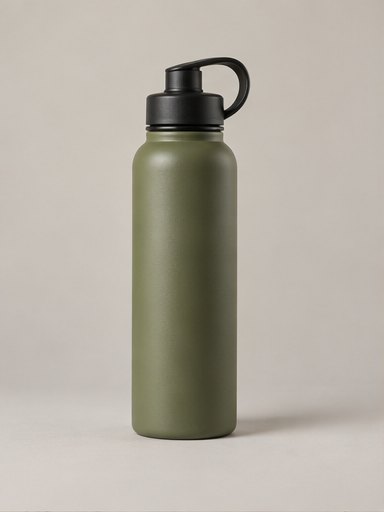
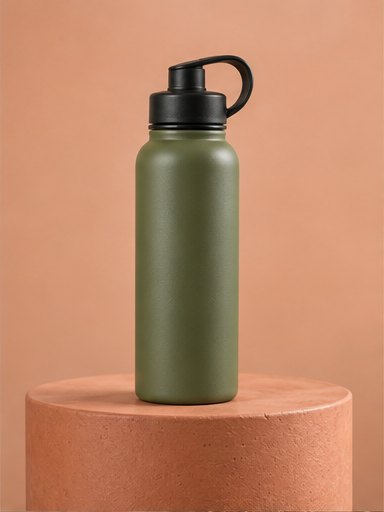
We compared the two existing demo images on 9 November 2026. The first shows an olive-green bottle with a black cap and loop against a neutral background. The second places a similar bottle on a terracotta plinth against a peach background. The cap, loop and bottle silhouette remain recognisable, while the scene and lighting change.
This is a visual review of the public demo assets, not a new generation test or customer case study. The original generation prompt, elapsed time, cost and rejected versions are not recorded here. The fictional brief below illustrates how to write a brief; it is not the recorded prompt behind these images.
- Keep: a new scene that leaves the actual product recognisable and does not add accessories for sale.
- Check: the green finish against the real bottle, because warmer scene lighting can change how a colour appears.
- Reject: a changed cap, handle, label or product shape. Regenerate the image or use your real photo if a correction does not hold.
- Edit the caption: a picture cannot prove capacity, insulation performance, delivery coverage or stock. Add those facts only when you can verify them.
Step by step
1. Take one good photo
The real bottle, filling the frame, in daylight, label facing the camera.
2. Write a short brief
One product, one goal, one audience, one reason to buy. See the reusable brief below.
3. Make the campaign
In YenzaNow, say what you want to promote, add the photo and choose the goal. You get several images and captions on the same theme.
4. Check every image
Use the checklist below. Drop any image that changes the product.
5. Edit the captions
Add your real price, delivery details and how to order.
6. Post over a week
Lead with the strongest image, follow with the rest, and reply to every message.
Reusable brief
Copy this and fill it in
- Promote
- [One product, by name]
- Goal
- [Sales / enquiries / bookings / awareness]
- Who it’s for
- [One sentence about the customer]
- Why now
- [Season, launch, restock or offer]
- Must be true
- [Colour, size, what’s included]
- How to buy
- [Link, number or “message us”]
Thandi’s brief and a caption
Worked example — fictional
- Promote
- Green 1-litre insulated bottle
- Goal
- Sales
- Who it’s for
- Parents packing school bags
- Why now
- Back to school
- Must be true
- Sage green, black lid, 1 litre
- Caption
- Everyday refill, sorted. Meet our green bottle. Message us for the current price and delivery options.
Before-you-post checklist
- The product’s shape, colour and lid match the real item.
- Label text and logos are correct, or not visible.
- Nothing has been added that the customer will not receive.
- Price, delivery and ordering details are yours and current.
- Any claim in the caption is true.
- The image suits the channel you are posting on.
What YenzaNow does and does not do
It makes campaign images and captions from your photo, in your brand’s look and voice, for you to download and share. It does not set your prices or guarantee sales, and AI images can alter small details — which is why the checklist matters.
Check whether the campaign helped
Record the offer, publication date and channel. Use a tagged website link or a distinct enquiry phrase so you can identify responses from this campaign. Compare enquiries, bookings or orders with your usual activity over a similar period, and note any paid promotion or other changes. Views and likes alone do not show whether a campaign brought customers.
Questions
Do I need more than one photo?
No. One clear photo of the real product is enough to start a campaign.
Can I reuse the brief?
Yes. Copy the template for each product or offer you want to promote.
Related
- AI product photography — New scenes from the product photos you already have.
- AI ad generator — Campaign creatives for products and services.
- Social media content — Images and captions ready to post.
- Industries — Promotion ideas for salons, cafés, fashion and services.