AI product photography from the photos you already have
YenzaNow is AI marketing software for small businesses. You tell it what you want to promote and add a photo; it makes campaign images and captions in your brand’s look and voice, and you approve, download and share them yourself. It is a tool you use, not a full-service agency.
Product photography in YenzaNow starts from your own photo of the real item. It places that product in new, styled scenes for your campaign — it does not design a new product.
From a plain photo to a campaign scene
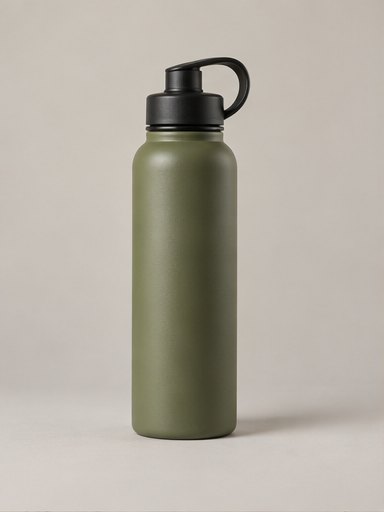
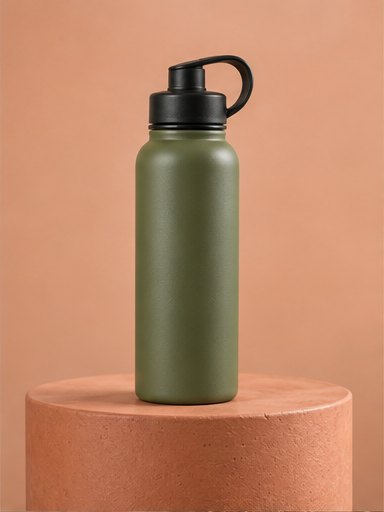
The example below starts with a simple photo of a water bottle on a grey background. The campaign image keeps the bottle and changes the setting, light and colour around it.
How to take a photo that works
- Photograph the actual product, not a picture from a supplier catalogue you do not own.
- Use daylight from a window and avoid hard flash.
- Fill most of the frame with the product, with nothing covering it.
- Keep labels facing the camera and in focus.
- Take one photo per product. Sets and bundles are clearer as their own photo.
Accuracy and limitations
Generated scenes are a starting point, not proof of what the product looks like. Before you post, check:
- Shape, size and proportions match the real item.
- Colours are true — screens and AI both drift.
- Label text, logos and small print are correct. Small text is the detail most likely to change.
- Nothing has been added that the product does not include, such as extra parts or a different lid.
- Food, cosmetics and clothing still look like what the customer will actually receive.
When a real photoshoot is still better
For detailed technical products, close-up texture shots, size guides or anything a customer relies on to make a safety or fit decision, use real photographs. AI scenes suit campaign and social images where the setting sells the mood and the product itself stays true.
Questions
Will the product look exactly like mine?
It is built from your photo, but small details can change. Always compare with the real item before posting.
Can I use a photo taken on my phone?
Yes. A clear, well-lit phone photo is enough.
Can it photograph a product I have not made yet?
No. Start from a photo of the real product so customers see what they will get.
Related
- Product photos with your phone — Daylight, a clean lens and a plain background.
- AI ad generator — Campaign creatives for products and services.
- Guide: one product photo into a campaign — A worked example with a reusable brief.
- Fashion brands — Accuracy matters most with clothing.
- Social media content — Images and captions ready to post.